

Acquiring OneDrive & SharePoint Attachments of Emails
Forensic Email Collector (FEC) can acquire OneDrive / SharePoint modern attachments and their revisions during Microsoft Graph API and Exchange Web Services (EWS) acquisitions. When using Microsoft Graph API, OneDrive modern attachments can be acquired both for M365 and personal Microsoft accounts while EWS does not support personal Microsoft accounts.
You will be presented with the following options on the Graph API or EWS settings page:
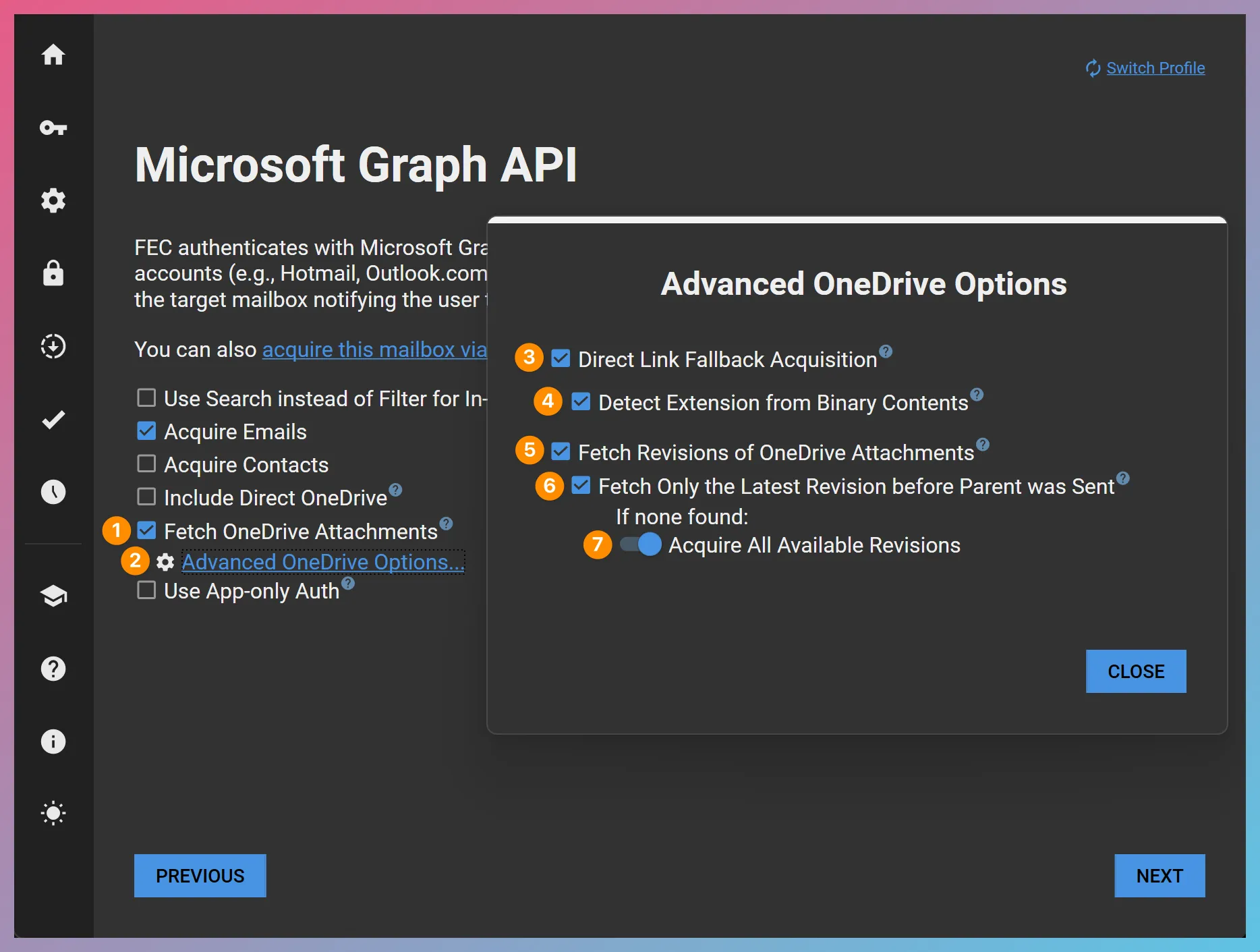
OneDrive Attachment Acquisition Options
Section titled “OneDrive Attachment Acquisition Options”1. Fetch OneDrive Attachments
Section titled “1. Fetch OneDrive Attachments”When this option is selected, FEC will detect OneDrive Attachments in acquired emails and attempt to acquire them. This includes both the OneDrive items that originated from the target user’s own OneDrive and outside items that were shared with the user. IMPORTANT The OneDrive Attachment is the current version of the OneDrive item at the time of acquisition.
2. Advanced OneDrive Options
Section titled “2. Advanced OneDrive Options”Opens the Advanced OneDrive Options page where additional options can be specified.
3. Direct Link Fallback Acquisition
Section titled “3. Direct Link Fallback Acquisition”Some modern attachments encountered in emails may not be sharing links, but direct hyperlinks to an item in OneDrive or SharePoint. This option controls whether FEC should attempt to directly download items using such hyperlinks.
IMPORTANT Items acquired using Direct Link Fallback Acquisition typically do not have a Service ID and have little to no metadata.
4. Detect Extension from Binary Contents
Section titled “4. Detect Extension from Binary Contents”When an item is acquired via Direct Link Fallback Acquisition, its filename and extension may be unknown. In such scenarios, enabling this option would cause FEC to attempt to determine the file type from the binary contents of the acquired file.
5. Fetch Revisions of OneDrive Attachments
Section titled “5. Fetch Revisions of OneDrive Attachments”When this option is selected, FEC will also request revision information for each OneDrive Attachment from Graph API. If the item has revisions, they will be acquired along with the parent OneDrive Attachment.
6. Fetch Only the Latest Revision Before Parent was Sent
Section titled “6. Fetch Only the Latest Revision Before Parent was Sent”A OneDrive Attachment that was referenced in an email can continue to be modified after the email was sent. When this option is selected, FEC will limit OneDrive revision acquisition to the latest OneDrive revision before the sent date of the email.
For example, let’s look at the following timeline:
-
A file was created on OneDrive on January 1, 2019
-
The file was revised on March 1, 2019
-
The file was revised again on March 15, 2019
-
The file was attached to an email as a OneDrive Attachment and sent on April 1, 2019
-
The file was revised again on May 1, 2019
When the Fetch Only the Latest Revision Before Parent was Sent option is selected, the current version of the OneDrive Attachment (as of May 1, 2019) and the latest OneDrive revision before the email was sent (as of March 15, 2019) would be acquired.
7. Do not Acquire Any Revisions / Acquire All Revisions Instead (Toggle)
Section titled “7. Do not Acquire Any Revisions / Acquire All Revisions Instead (Toggle)”This toggle controls FEC’s behavior when the Fetch Only the Latest Revision Before Parent was Sent option is enabled, but no such revision can be found. You can direct FEC to acquire all revisions for that OneDrive item instead, or not to acquire any revisions for that OneDrive item.
How Are the OneDrive Attachments and Revisions Stored?
Section titled “How Are the OneDrive Attachments and Revisions Stored?”You can find the acquired OneDrive Attachments and their revisions inside your output folder in a folder structure that looks as follows:
Directory
<project root>DirectoryItems
Directory
!-- Drive Attachments --!Directory
<Parent Message ID>Directory
<OneDrive Attachment No>Directory
Revision_<revision date>_<revision ID>- …
- …
- …
DirectoryLogs
- Downloaded_Drive_Attachments.csv
- Remaining_Drive_Attachments.csv
- Downloaded_Drive_Attachment_Revisions.csv
- Remaining_Drive_Attachment_Revisions.csv
- …
The creation and last modification file system timestamps of the acquired OneDrive Attachments and their revisions will be set to reflect the file metadata acquired from Microsoft Graph API.