

FEC Output Settings
Forensic Email Collector (FEC) provides a number of options regarding its output.
Output Format
Section titled “Output Format”Preserved emails can be saved in the following three formats. You can choose multiple formats if you wish; FEC will save the messages in multiple formats simultaneously without requiring a conversion after the fact.
EML (MIME) Format
Section titled “EML (MIME) Format”Regardless of which server type is used, FEC retrieves emails from mail servers over the internet in Internet Message Format as defined by RFC 5322 ↗. Messages in this format can be saved as plain text files with the .EML file extension and can be rendered by numerous email clients.
This format is achieved without a conversion being performed by FEC and is therefore recommended for forensic preservation. Numerous investigative techniques such as DKIM and ARC verification and content-length checks depend on the availability of MIME output. We recommend that you always keep the MIME output option enabled even if you do not plan to immediately use MIME output.
MSG Format
Section titled “MSG Format”Outlook Item (.msg) File Format ↗ is based on the Compound File Binary File Format. It is used primarily to store a message object (e.g., email, appointment, contact, etc.) in a file.
MSG format is commonly used in digital forensics and eDiscovery and is supported by FEC as an output option. Exporting messages in MSG format requires a conversion from the MIME format described above.
PST Format
Section titled “PST Format”Outlook Personal Folders (.pst) File Format ↗ is a complex file format that allows storing multiple message objects in a single container file.
PST files have maximum file size limits ↗ depending on the version of Outlook. FEC allows you to split output PST files when a certain size threshold is reached. For example, in the example screenshot below, FEC would create a new PST file once the output PST reaches ~20 GB. This also helps with eDiscovery and digital forensics tools that do not play nicely with large PST files.
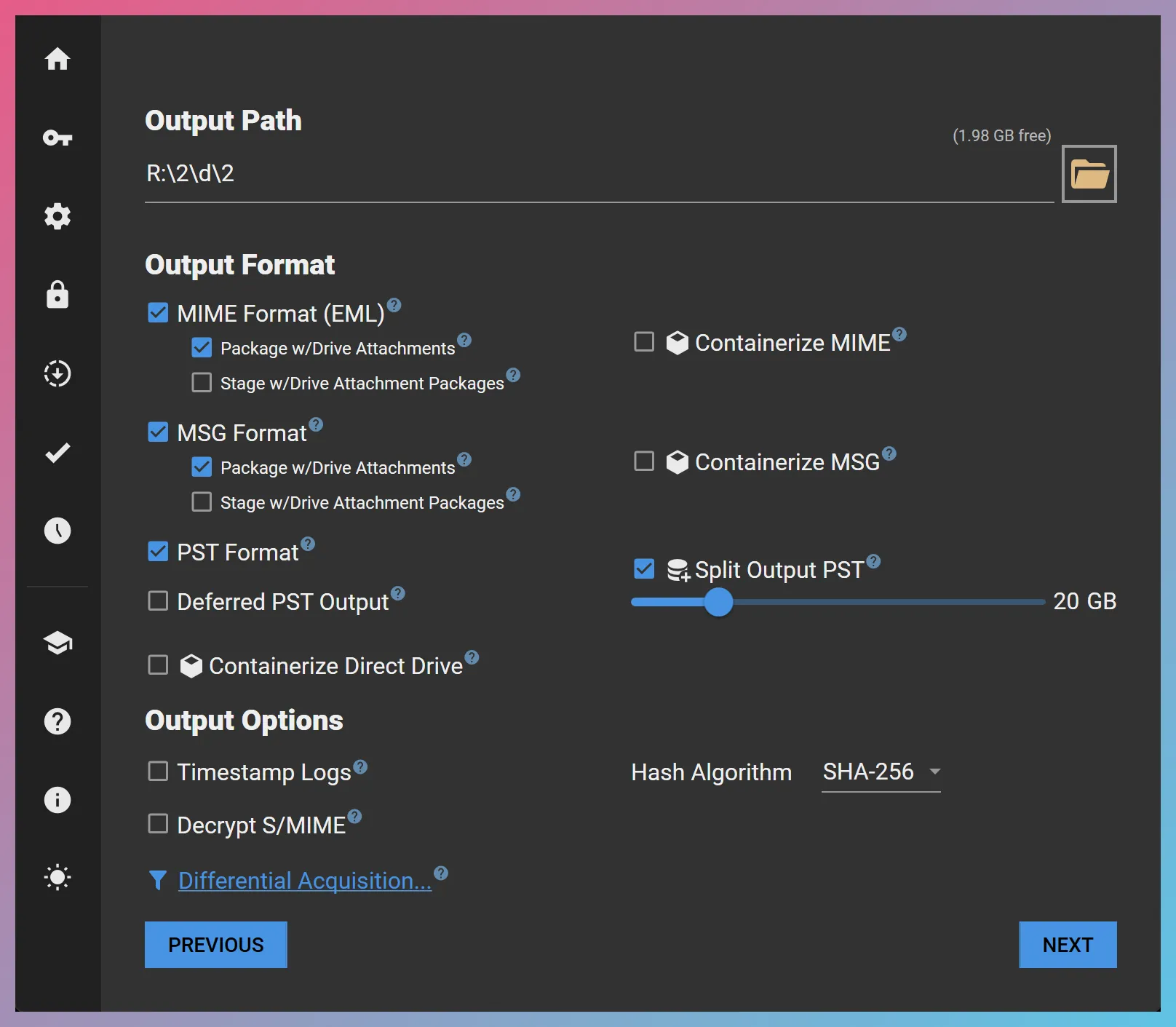
Once the acquisition is complete, FEC closes the output PST file and hashes it depending on your output hashing preference.
Deferred PST Output
Section titled “Deferred PST Output”When the PST Format option is selected, FEC would build the output PST(s) progressively during the acquisition. In some cases, it may be desirable to defer PST creation until after the acquisition is completed. You can achieve this by choosing the Deferred PST Output option. When selected, FEC would schedule a PST creation operation once the acquisition is complete.
Containerize MIME/MSG
Section titled “Containerize MIME/MSG”When selected, these options cause FEC to create VHDX disk images to house its EML and/or MSG output. This is typically useful for chain of custody tracking as the VHDX images are automatically hashed and logged. Moreover, keeping the loose EML/MSG files inside a container helps maintain the file system metadata associated with these files.
The resulting VHDX disk images can later be mounted as a read-only disk image for ingestion, or can be directly ingested into eDiscovery or digital forensics tools.
Package w/Drive Attachments
Section titled “Package w/Drive Attachments”This option controls whether FEC should bundle parent emails with their modern attachments (and their revisions) to establish parent/child relationships.
Stage w/Drive Attachment Packages
Section titled “Stage w/Drive Attachment Packages”This option controls whether FEC should perform a staging operation to create a combined output set ready for ingestion. The output set would retain the folder structure of the emails. For emails without modern attachments, the output would contain the email itself. For emails with modern attachments, the output would contain the Drive Attachment Package.
Output Options
Section titled “Output Options”Decrypt S/MIME
Section titled “Decrypt S/MIME”Controls if FEC will scan for S/MIME-encrypted items and attempt to decrypt them (see S/MIME Decryption for details).
Timestamp Logs
Section titled “Timestamp Logs”This option becomes visible only after a Time Stamp Authority (TSA) server URL is entered in FEC’s preferences. If selected, contents of the “Logs” folder are compressed into a ZIP archive at the end of each acquisition session and timestamped by the specified timestamping (see Trusted Timestamping for details).
Hash Algorithm
Section titled “Hash Algorithm”FEC performs cryptographic hashing on the output files including EML, MSG, and PST output. You can specify MD5 ↗, SHA-1 ↗, SHA-256 ↗, or SHA-512 as your hashing algorithm of choice.
n Files per Folder
Section titled “n Files per Folder”Many file systems do not deal very well with folders containing a large number of files. If you anticipate that a mail folder may contain a large number of items (e.g., more than 10,000 messages), it may be a good idea to choose this option to have FEC create subfolders within each output mail folder.
This would break the mail folder into subfolders containing a predetermined number of files that you specify. For instance, if you specified 1,000 files per folder, an inbox containing 2,359 items may look as follows:
DirectoryInbox
Directory0001/ Contains the first 1,000 items
- …
Directory0002/ Contains the next 1,000 items
- …
Directory0003/ Contains the remaining 359 items
- …